
Admin Dashboard
Yaspa’s admin dashboard is where you manage all aspects of your Yaspa virtual accounts.
Yaspa’s admin dashboard is where you manage all aspects of your Yaspa merchant account(s), and it provides everything you need to get started. It is connected to your business bank account(s) via the Yaspa API, and through the dashboard you can view and manage payments made by, and to, your end customers.
The Admin console is used to perform a number of important administration and support tasks:
- During integration, it's used by administrators and integration engineers to configure the payment experience.
- Once live, it's used by support staff to look at transactions, virtual account balances and risk insights.
There are two deployments of the Admin Dashboard for test and for production environments.
| Environment | Admin Console |
|---|---|
| Test Sign-in | https://test.yaspa.com/#/login |
| Live Sign-in | https://admin.yaspa.com/#/login |
Adding Company Users
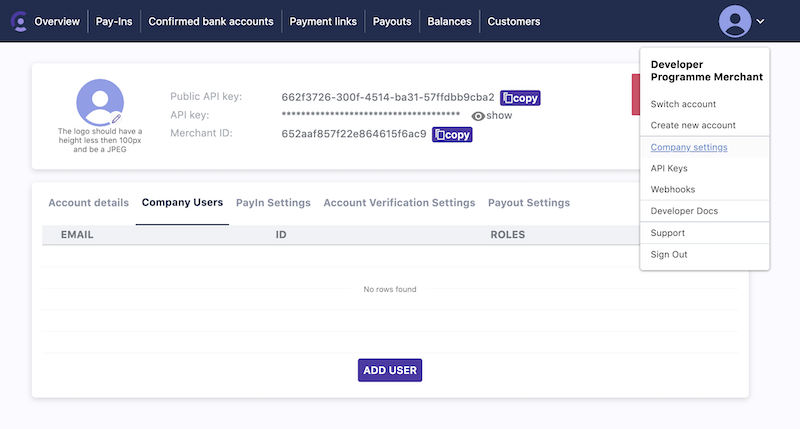
The Admin Dashboard allows merchants to add more Company Users to help administer their integration. Click on the profile Icon on the top right of the Dashboard and select Company Settings option.
Users can be added from the Company Users tab.
Click the Add User button, and you will be presented with a series of roles you can assign to the User.
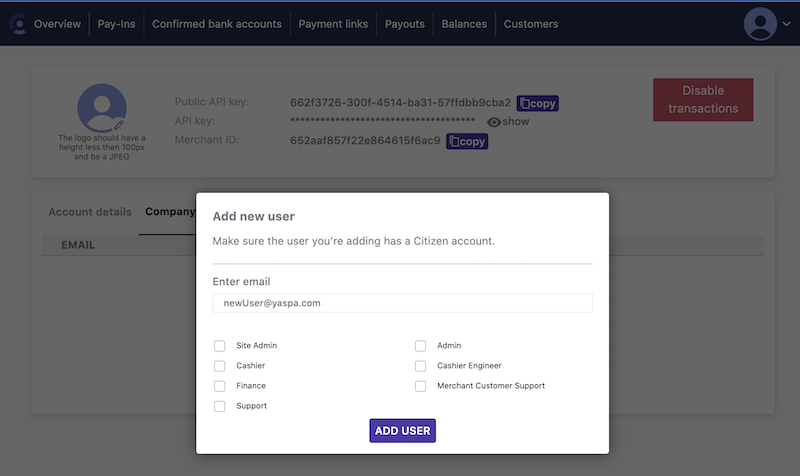
As staff using the Admin Dashboard will have different jobs, they all will need different roles, this enforces the good security principle of supplying the minimum required access to staff to perform their jobs.
Role Based Security by Job
We have defined four typical jobs and what roles we suggest those staff receive:
| Job | Roles | Explanation |
|---|---|---|
| Owner | Site Admin, Admin, Support, Finance | These users have the Site Admin role. This is the highest level of privilege in Yaspa. This user can give themselves and staff any role they like. Including financial roles. Because of the sensitivity of the financial role, we suggest having few trusted staff performing this job. |
| Admin | Admin, Support | These users are able to add staff with any permissions except the Site Admin and Finance role. Admins are responsible for the day to day running of the operation and Support |
| Finance | Finance, Support | These Users lack the ability to add Users, but can see all financial information and Support screens.\ The Finance role will allow them to conduct their financial reports and operations |
| Customer Support | Support | These Users are responsible for the day to day Support functions. These are able to investigate Customers and payments but have no write privileges to anything in the System |
Role Base Security by Role
More roles are available and these can be used to turn on addition payment features. Talk to the Yaspa Customer Success manager to find out more. The complete list of roles is explained below:
| Role | Description |
|---|---|
| Site Admin | The Site Admin role is the highest level of privilege in Yaspa. The Site Admin can add and remove any user and grant whatever roles they choose. Site Admins can also remove other Site Admins |
| Admin | The Admin role is responsible for day-to-day administration. The Admin can add and remove any user except for Site Admins. They can grant any privilege except for the Site Admin and Finance roles. Admins can also remove other Admins |
| Finance | This role has permissions to see Balances. Future updates to the tool will play the Payout SSH keys also under their control |
| Support | This role has view access to the payin and payout screens. This role is designed for Customer Support and provides a broad set of read-only privileges. |
| Cashier | This Role has to view the Cashier screen. This is used for payments at physical locations, where Yaspa is being used at Point of Sale and Cashiers want to mark up which Payments have been made. |
| Cashier Engineer | This Role has permissions to create, update and delete both permanent and one shot Payment links. |
Updated over 1 year ago