
Instant Payouts
Understanding Yaspa's Payout product
Overview
The Instant Payouts product allows customers to request a payment from the merchant bank account to their own. There are two key journey types available: direct, which is an API-only flow, and hosted. The instant payout journey is typically linked to the merchant's withdrawal pages of their website and when the customer proceeds with the payment.
To start a Hosted Payout, merchants send Yaspa a Payout Instruction API call, with details of the payout being made, including amount, currency, customer identifier, and potentially merchant bank account etc., and then Yaspa returns a URL. This should then be opened for the customer, allowing them to complete the payout journey.
The direct payout flow is very similar, however, the customer account ID needs to be sent in the payout instruction. This is returned in the complete webhook of enhanced pay-ins. This will allow Yaspa to process the payout without any hosted screens. This journey creates a smoother payout process for the customer. This will require the merchant to have a flow where the customer selects the account they want to be paid out to, as well as a screen to confirm the payout has been requested.
Merchants will decrement customer balances based on completion of the payout process from the customer side — typically this is when the payout is queued for approval, based on the Instant Payouts - Webhooks. See the Integration Overview for more details of the integration.
Different Payout Options
The Instant Payouts product relies on the merchant using a Yaspa Virtual Account — this allows Yaspa to make Payouts on the merchant's behalf. payouts are very configurable and below are 6 integration variations:
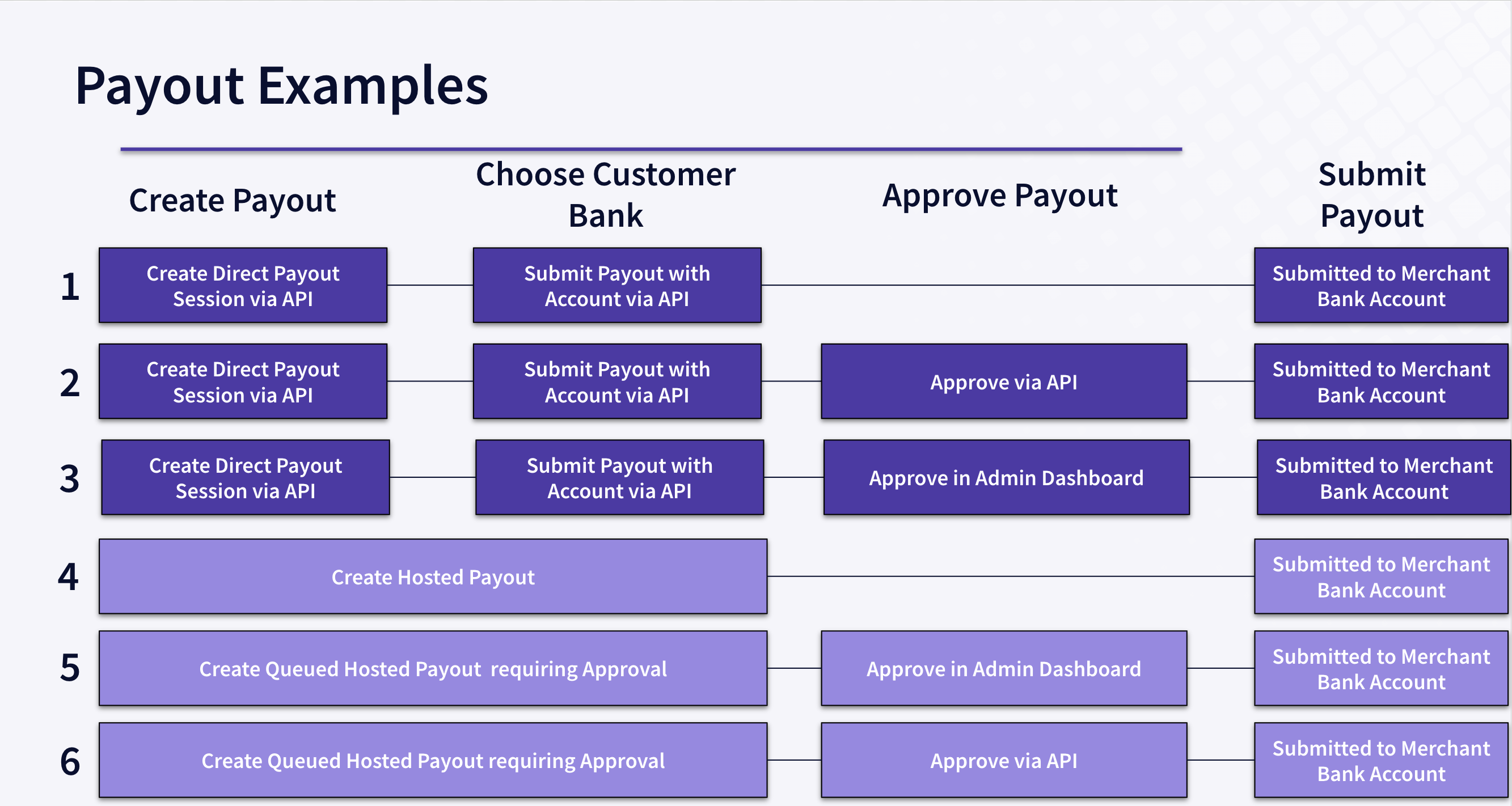
- Option 1 – Customer chooses bank account via merchant screens and the merchant server submits the payout via API, payout is immediately submitted to the merchant bank.
- Option 2 – Customer chooses bank account via merchant screens and the merchant server submits the payout via API, payout is approved by the merchant customer representative in the Yaspa admin dashboard and the payout is submitted to the merchant bank.
- Option 3 – customer chooses bank account via merchant screens and the merchant server submits the payout via API, payout is approved by the merchant customer representative in the merchant admin dashboard, this submits the request to Yaspa server and the payout is submitted to the merchant bank.
- Option 4 – Customer chooses bank via hosted pages, payout is immediately submitted to the merchant bank.
- Option 5 – Customer chooses bank via hosted pages, payout is approved by the merchant customer representative in the Yaspa admin dashboard and the payout is submitted to the merchant bank.
- Option 6 – Customer chooses bank via hosted pages, payout is approved by the merchant customer representative in the merchant admin dashboard, this submits the request to Yaspa server and the payout is submitted to the merchant bank.
There are additional configuration options for hosted payouts where payouts can be made as closed loop payouts, meaning only bank accounts used for Instant Payments – pay-ins – or attached via Account Verifications can be used. This feature can be used for AML reasons to return funds to the correct cards. This is configurable when the Payout Instruction is submitted.
Where security is less of a concern, customers can be allowed to manually enter their bank account details. This is configurable when the payout instruction is submitted.
Updated about 1 year ago