
Pay-in Additional Features
Additional features are optional pieces of functionality that will help with conversion, customer experience and success of the product based on your use case. This page will run through what features we offer, how they work, what value they bring and finally, an introduction to the technical requirements to integrate with this.
Enhanced Pay-ins
Enabling Feature
- Option 1 : The merchant can set the "journeyType" : "ENHANCED_PAYIN"
- Option 2 : Yaspa can set a Pay-In override on the merchant account. Changing all journeys to Enhanced Pay-ins.
Description
Yaspa collects and verifies the payee’s details upon transaction completion and shares them with the merchant for added transparency and security. This ensures compliance with KYC (Know Your Customer) and fraud prevention measures.
- In Europe - We return the Account Name, IBAN of the Payer
- In UK - We return the Account Name, Account Number and Sort Code
This data will be added onto the PAYIN_COMPLETE webhook. See Instant Payments - Webhooks
In addition once as Account is saved, this data will be added onto the PAYIN_DECISION : ACCEPTED webhook.
Direct to Bank Pay-in
Enabling Feature
- Add the "bank" parameter to the pay-in instruction with ONE of the bank values below
Description
Direct to Bank allows customers to go straight to confirming their bank details without needing to select their bank separately. This is achieved by passing in a bank parameter into the pay-in instruction; examples of the bank names are below:
| Country | Banks' values to use (Choose one from the list) |
|---|---|
| NL | REVOLUT_EU, ING, ABN_AMRO, RABO, SNS_BANK, ASN |
| DE | Ask Yaspa for details |
| GB | Ask Yaspa for details |
| FR | Ask Yaspa for details |
KYC Data
Enabling Feature
- Add the customerDetails parameter to the pay-in instruction with a JSON object of additional key/values from the table below.
Description
Customer data can be passed into the Pay-in and Payout instructions. This allows Yaspa to answer EMI Request For Information (RFI) requests for PEPs and Sanctions requests on the merchant's behalf.
Yaspa advises merchants to send us customer details in order to streamline RFI requests from the bank. This allows Yaspa to manage 90% of RFI's without having to contact the Merchant.
Any or all of the following optional data can be passed into the instruction to help with RFIs
| Field | Description | Type | Example |
|---|---|---|---|
sex | Sex. One of: "MALE", "FEMALE", "UNKNOWN", "X" | string | "UNKNOWN" |
firstName | First name | string | "John" |
lastName | Last name | string | "Jonsson" |
street | Street address | string | "Epworth 1" |
city | City name | string | "London" |
state | State name or ISO 2 (abbreviated when applicable) | string | "London" |
zip | Postal zip code | string | "EC2A 4DN" |
country | Country code of residence (3-letter ISO), e.g. GBR, SWE | string | "GBR" |
email | User's email | string | "[email protected]" |
dob | Date of birth in format YYYY-MM-DD | string | "1970-01-01" |
mobile | Mobile number including country code. Prefixed with +, no spaces/delimiters | string | "+46733123123" |
affiliateId | Where the payment can be attributed to a specific traffic affiliate, the affiliate ID can be passed to Yaspa who can provide insights on the trends around specific groups of traffic. | string | Website101 |
| brandName | When merchants integrate with Yaspa via a PSP, sometimes the original lobby URL is masked. In these cases, Yaspa asks the merchant to pass through the lobby URL here - this aids support and diagnosis of merchant issues | string | Merchant Site NL |
customerValue | This string represents the customer value as perceived by the merchant. This will allow Yaspa to generate insights on trends for subcategories of users and also help to increase accuracy for categorisation. | string | VIP 5000 |
Example body
{
   "reference": "ud6i4vcf5dqa",
   "customerIdentifier": "ud6i4vcf5dqa",
   "paymentGiro": "FPS", "amount": "2",
   "currency": "GBP",
   "payload": "payload123",
   "journeyType": "HOSTED\_PAYMENT",
   "customerDetails": {
      "sex": "UNKNOWN",
      "firstName": "John",
      "lastName": "Jonsson",
      "street": "Storgatan 1",
      "city": "Stockholm",
      "state": "Stockholm",
      "zip": "177 32",
      "country": "SWE",
      "email": "[email protected])",
      "dob": "1981-01-01",
      "affiliateId":"Website101",
      "customerValue":"VIP 5000",
      "brandName": "Merchant Site NL",
      "mobile": "+46733123123"

   }
}
White labelling
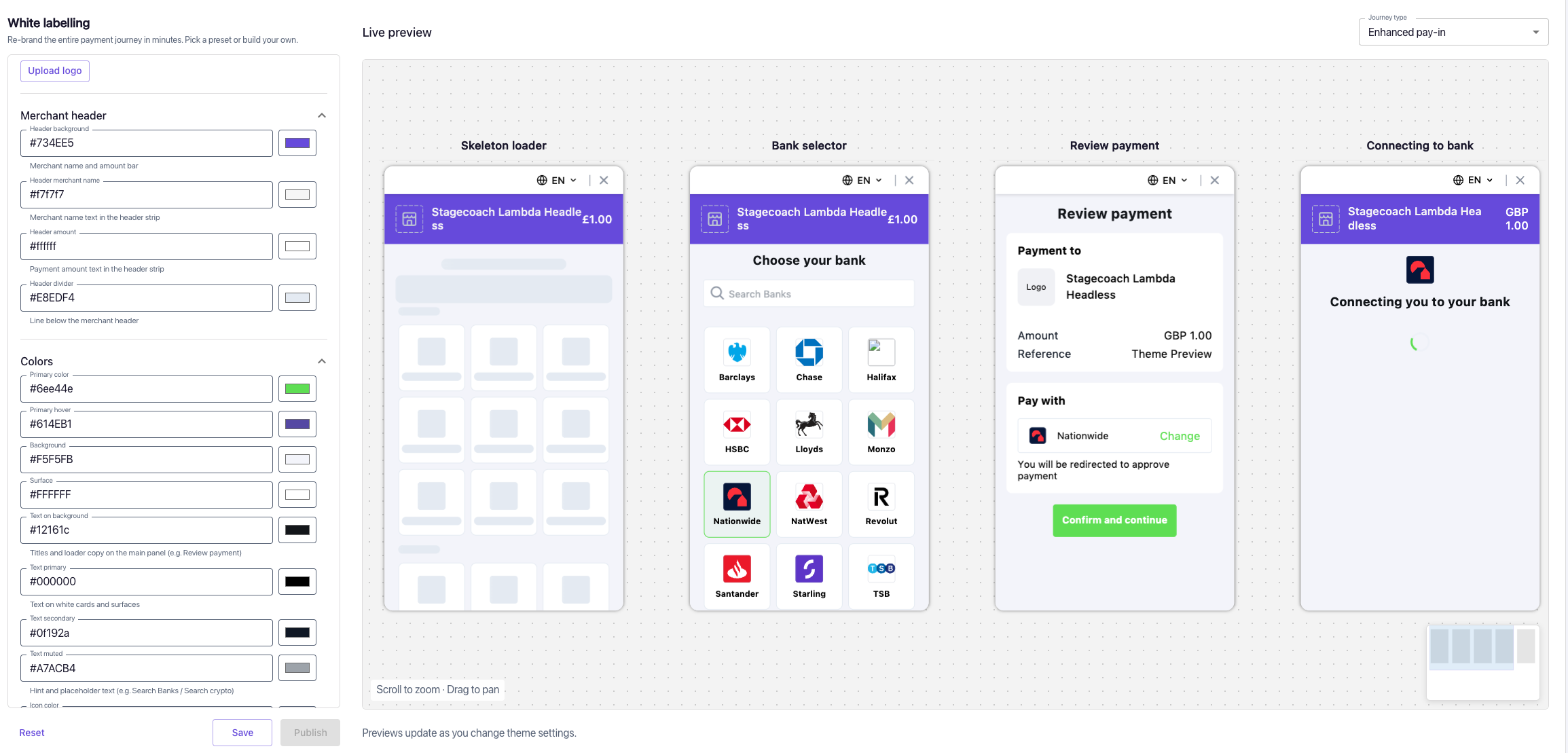
Yaspa's white labelling capabilities let merchants tailor the pay-in journey to their own brand, from full control over the interface through to targeted styling of Yaspa-hosted components.
Hosted Page styling
For merchants using Yaspa's hosted pages, components can be styled to match the merchant's own brand:
- Colours: buttons, backgrounds and other UI elements can be customised.
- Logo: Yaspa's default logo can be replaced with the merchant's own.
Individual Screen replace
Merchants take over more of the payment journey by replacing Yaspa screens with their own, be that the Bank selector, payment review or outcomes pages. Merchants are free to replace nearly all of the Yaspa screens, creating a headless journey where the merchant is nearly entirely responsible for the UI.
With screen replacement, merchants can:
- Design and control the payment UI, matching their own brand and product experience.
- Optimise conversion at each step of the journey without being tied to a fixed flow.
- Capture granular, step-level metrics across the payment journey, from initiation through to completion.
Updated about 2 months ago