
Pay-in Integration Flow
Understanding the Pay-In journey
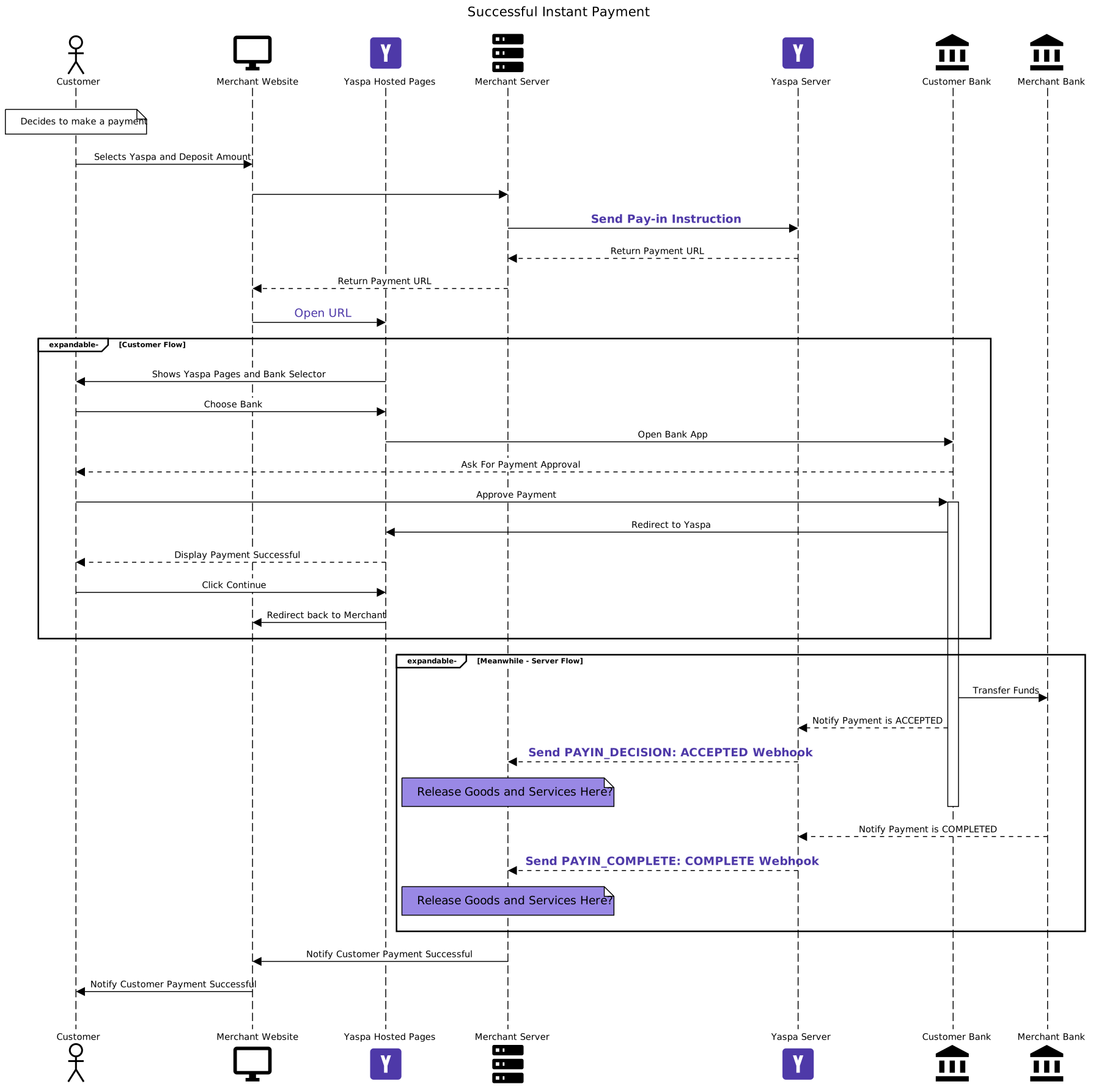
This section provides a detailed view of communications between the customer, merchant, Yaspa and the customer and merchant banks. Important flows have been highlighted in purple. The focus of any integration should be on these points.
Key Participants
Customer – The end user trying to make a pay-in on the merchant website
Merchant Website – The frontend merchant website, as accessible by the customer via their browser
Yaspa Hosted Pages – The frontend Yaspa pages, the customer is redirected to these pages to select their bank and complete the Payment
merchant Server – The backend merchant server. This is the secure portion of the merchant application which will create pay-in instructions and handle Webhooks. For security reasons it’s critically important these two activities are done on the secure server
Yaspa Server – The backend Yaspa server. This is the secure portion of the Yaspa application which will receive the pay-in instructions, send Webhooks and power the Yaspa Hosted Pages
Customer Bank – The banking institution used by the customer. The customer will pick the banking institution they use on the Yaspa Hosted Pages. The customer bank here covers both the customer banking app used by the customer and the servers used to make the payments.
Merchant Bank – The bank or the Yaspa Virtual Accounts used by the merchant to receive and hold funds.
Successful Instant Payment Flow
Below is a sequence diagram of a successful Instant Payment:
Key stages
Initiating the Instant Payment
SendPay-in Instruction – The merchant sends Yaspa an instruction to make a payment link. See Instant Payments - Pay-in Instruction
Open URL – The pay-in Instruction will return a URL, which needs to be opened on the merchant website for the customer.
Handing the Instant Payment Success Notification
Send PAYIN_DECISION: ACCEPTED webhook – Yaspa will send the merchant server a PAYIN_DECISION: ACCEPTED webhook. This states the customer bank has agreed to send the funds. Merchants can choose to release goods and services here. See Instant Payments - Webhooks
Send PAYIN_COMPLETE: COMPLETE webhook – Yaspa will send the merchant Server a PAYIN_COMPLETE: COMPLETE webhook. This states the merchant bank has received the funds and the payment is fully complete. Merchants should release goods and services here. See Instant Payments - Webhooks
Updated about 1 year ago