
Guaranteed Payments
Yaspa's Guaranteed Payments product enables merchants to accept guaranteed pay-ins from consumer checking / savings accounts.
Integration follows the convention laid out in the Product Overview. Send Yaspa a pay-in instruction API call with the payment details and open the URL Yaspa returns to start the hosted pay-in journey. There, the customer grants Yaspa access to their account information. Yaspa then retrieves account, activity, and ownership information about each authorized account over open banking APIs, checks it against the customer information in your request to verify ownership, and applies fraud and risk rules. This culminates in a real-time payment approval backed by a guarantee.
At the end of the flow, Yaspa returns the customer to a configurable redirect URL and sends server-side webhook notifications at each status update. Accepted transactions are processed as debits over Same Day ACH and settle into a virtual account provisioned for the merchant. If Yaspa receives an eligible return (chargeback) for the transaction, Yaspa assumes liability for any losses and sends a webhook so you can flag the customer as high-risk and update controls accordingly.
Payment GuaranteeWhen a consumer grants access to their bank account data through open banking, Yaspa can retrieve rich account, activity and ownership information about each authorized account. This information verifies the account to comply with the NACHA Web Debit Account Validation Rule for all payments and also feeds Yaspa's fraud and risk rules.
As contractually agreed, Yaspa provides ACH return (also known as chargeback) protection and assumes financial liability for eligible ACH returns. The guarantee most often covers all ACH return codes. Integration considerations specific to this arrangement are included where relevant throughout this guide.
For the avoidance of doubt, Yaspa does not guarantee funds for transactions that are not approved, such as declines due to insufficient balance, and payouts are not guaranteed. Merchants will receive a Webhook Notification for each return.
Integration Guide
Create Hosted Pay-in API
When the customer selects Yaspa at checkout, use the Create Hosted Pay-in API to send Yaspa the information required to create a pay-in session as in the full example provided below:
curl --request POST \
  --url https://api.sandbox.us.yaspa.com/v2/payins/hosted-payin/generate-link \
  --header 'AuthorizationCitizen: {private API key}' \
  --header 'Accept: text/plain' \
  --header 'Content-Type: application/json' \
  --data '
{
  "customerIdentifier": "xekzyz3lorw9",
  "paymentGiro": "ACH",
  "amount": 10.01,
  "currency": "USD",
  "reference": "3pdcj42fpn9t",
  "journeyType": "INTELLIGENT_PAYMENT",
  "supportedCountries": ["US"],
  "successRedirectUrl": "http://www.example.com/success",
  "failureRedirectUrl": "http://www.example.com/failure",
  "customerDetails": {
    "firstName": "John",
    "lastName": "Smith",
    "email": "[email protected]",
    "dob": "1970-01-01",
    "mobile": "+15555555555",
    "address": {
      "address1": "123 Any Street",
      "address2": "Apt A",
      "city": "Boston",
      "stateCode": "MA",
      "zipCode": "02134",
      "countryCode": "US"
    }
  }
}
'
Upon receipt, Yaspa creates a transaction and maps it to a customer profile tied to the merchant. For customers paying the merchant with Yaspa for the first time, Yaspa creates a new customer tied to the the customerIdentifier paired with the customerDetails.email. The response is a link for the hosted pay-in session including a transaction identifier and a boolean to flag returning customers. Log the transaction-id value from the URL as this will be included in subsequent webhooks as the transactionId and can be used with the reference and customerIdentifier to tie the session and webhooks back to the your payment request and customer profile.
https://banks.sandbox.us.yaspa.com/hosted?transaction-id=d7941707-fe9f-fa8d-2491-3da414&secondTimeUser=falseRedirect Handler
Redirect the customer to the URL provided in the API response, paying particular attention to container version requirements in native mobile apps. When the customer completes the Yaspa journey, the hosted page redirects them to the success or failure URL, depending on the outcome. You can set these destinations as static values in the Admin Dashboard or at the transaction level using the successRedirectUrl and failureRedirectUrl parameters in the request. The per-transaction approach is strongly recommended because you can append data to the URLs. For example, use clearly distinct success and failure URLs and add the reference as a parameter to identify the result and session when the customer returns:
"successRedirectUrl": "https://www.example.com/success&ref={{ref}}",
"failureRedirectUrl": "https://www.example.com/failure&ref={{ref}}"Please note that while redirects are meant to inform the user experience following the Yaspa flow, business operations taken as part of a payment, particularly releasing funds and fulfilling orders, must be triggered based on webhooks rather than redirects or client-side interactions.
Webhooks
Yaspa sends webhooks for each status change throughout the customer journey and at milestones in the ensuing ACH processing. Release deposited funds or fulfill the goods or services ordered when the transaction is approved, as identified by the ACCEPTED status.
Webhooks for guaranteed payments follow the payment webhook version 3 structure and are sent as HTTPS POST requests. As noted above, several merchant-defined identifiers follow the transaction throughout its lifecycle so that it can be easily mapped to your payment stack. A typical example of the request body is as follows:
{
  "type": "PAYIN_DECISION",
  "data": {
    "id": "6ac021de351a3351401565cb",
    "transactionId": "d7941707-fe9f-fa8d-2491-3da414",
    "version": "3",
    "transactionType": "PAYIN",
    "transactionStatus": "ACCEPTED",
    "createdAt": "2026-10-02T21:27:58.510Z",
    "reference": "3pdcj42fpn9t",
    "language": "en",
    "merchant": {
      "id": "69bbee7367f8982c81665203",
      "tradingName": "example.com",
      "accountNumber": "cbe99239-943a-4ed7-98da-22da07e158b0",
      "bankCode": "cbe99239-943a-4ed7-98da-22da07e158b0"
    },
    "customer": {
      "identifier": "xekzyz3lorw9",
      "emailAddress": "[email protected]"
    },
    "account": {
      "identifier": "CHECKING",
      "financialInstitution": "US Test Bank",
      "holderName": "John Smith",
      "numberLastFour": "7890",
      "routingNumber": "222222226",
      "verificationTransactionId": "cd024f11-d382-24a2-35e8-87e7ae"
    },
    "payment": {
      "amount": "10.01",
      "currency": "USD",
      "giro": "ACH"
    },
    "journey": {
      "type": "INTELLIGENT_PAYMENT",
      "authType": "STANDARD",
      "verified": true,
      "enhanced": false
    }
  }
}
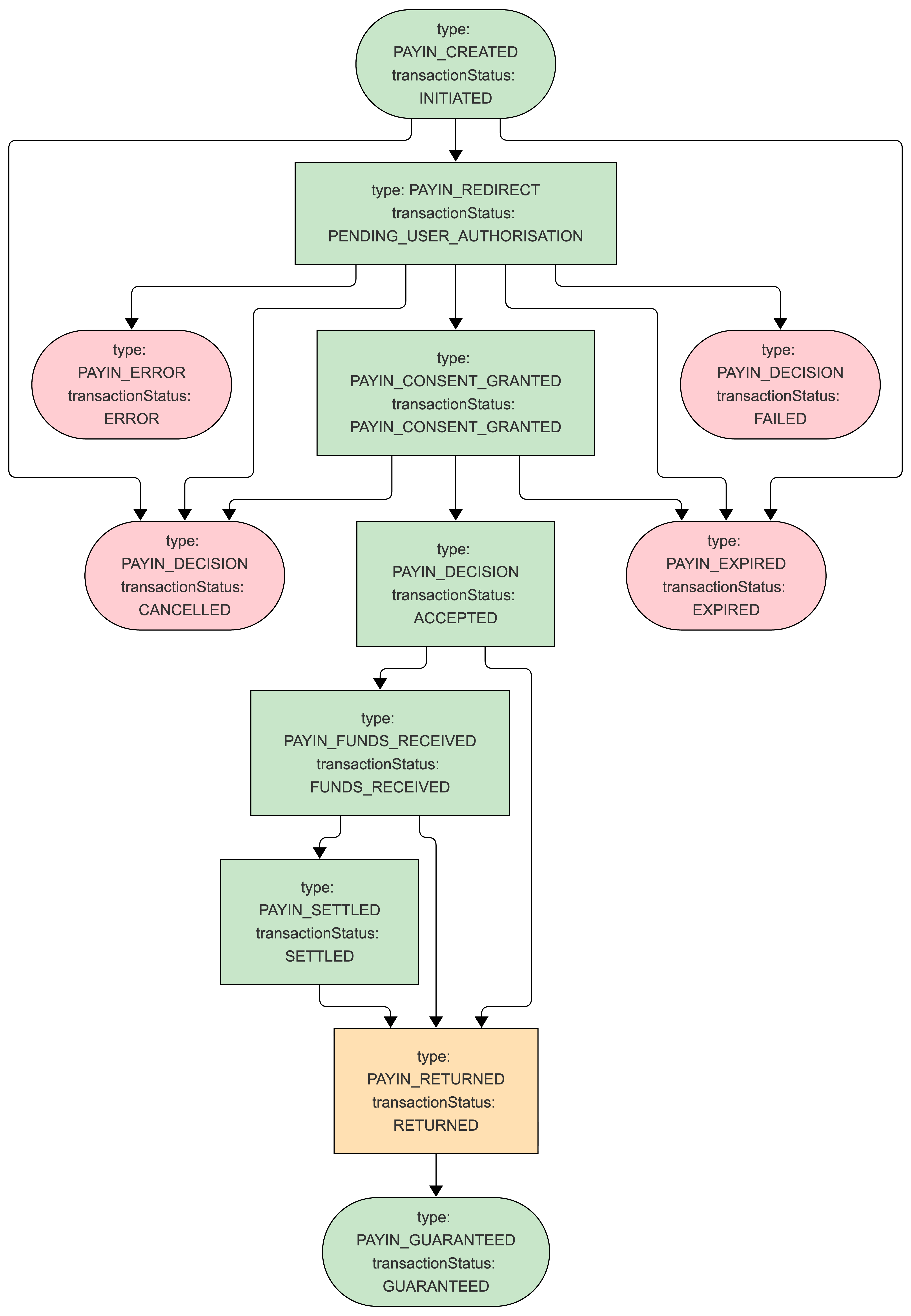
Type and Status Definitions
| Webhook type | Transaction status | Meaning |
|---|---|---|
PAYIN_CREATED | INITIATED | Starting point for the pay-in. |
PAYIN_REDIRECT | PENDING_USER_AUTHORISATION | Waiting for customer authorization. |
PAYIN_CONSENT_GRANTED | PAYIN_CONSENT_GRANTED | The customer has provided the required authorization. |
PAYIN_DECISION | ACCEPTED | Yaspa has agreed to process the payment and will submit it to the ACH network. Release deposited funds or fulfill goods or services at this time. |
PAYIN_EXPIRED | EXPIRED | Terminal failure. The customer did not complete the hosted flow, so the payment will not be processed. Typically after 30 minutes of inactivity. |
PAYIN_DECISION | FAILED | Terminal failure. The transaction was declined. See error and errorReason. |
PAYIN_DECISION | CANCELLED | Terminal failure. Cancelled before submission to the network, typically by the customer. Will not be processed. |
PAYIN_FUNDS_RECEIVED | FUNDS_RECEIVED | The transaction has settled over ACH and funds are held before being made available for withdrawal. |
PAYIN_SETTLED | SETTLED | Funds are released into the Available Balance for withdrawal. |
PAYIN_RETURNED | RETURNED | A return has been filed. See error and errorReason for the return code and description, and update risk controls. |
PAYIN_ERROR | ERROR | Terminal failure. A data mismatch before acceptance, or a return not covered by the guarantee after acceptance. |
PAYIN_GUARANTEED | GUARANTEED | Terminal. Yaspa has assumed liability for a return covered by the guarantee, and losses have been covered in the virtual account. |
Yaspa advances successful pay-ins to Complete status in the Admin Dashboard after 60 days to mark the end of the ACH return window; this status is not currently offered as a webhook.
Status Model
Only failures are truly terminal. SETTLED is not terminal because returns may be filed after settlement and funds have been made available. If a transaction is returned, Yaspa marks it RETURNED so that you can flag the customer as high-risk and update your risk controls. If the return code is covered by the guarantee, the status advances to GUARANTEED, which is terminal and means Yaspa has assumed financial liability for the return and covered any losses in the virtual account.
Recommended Configuration
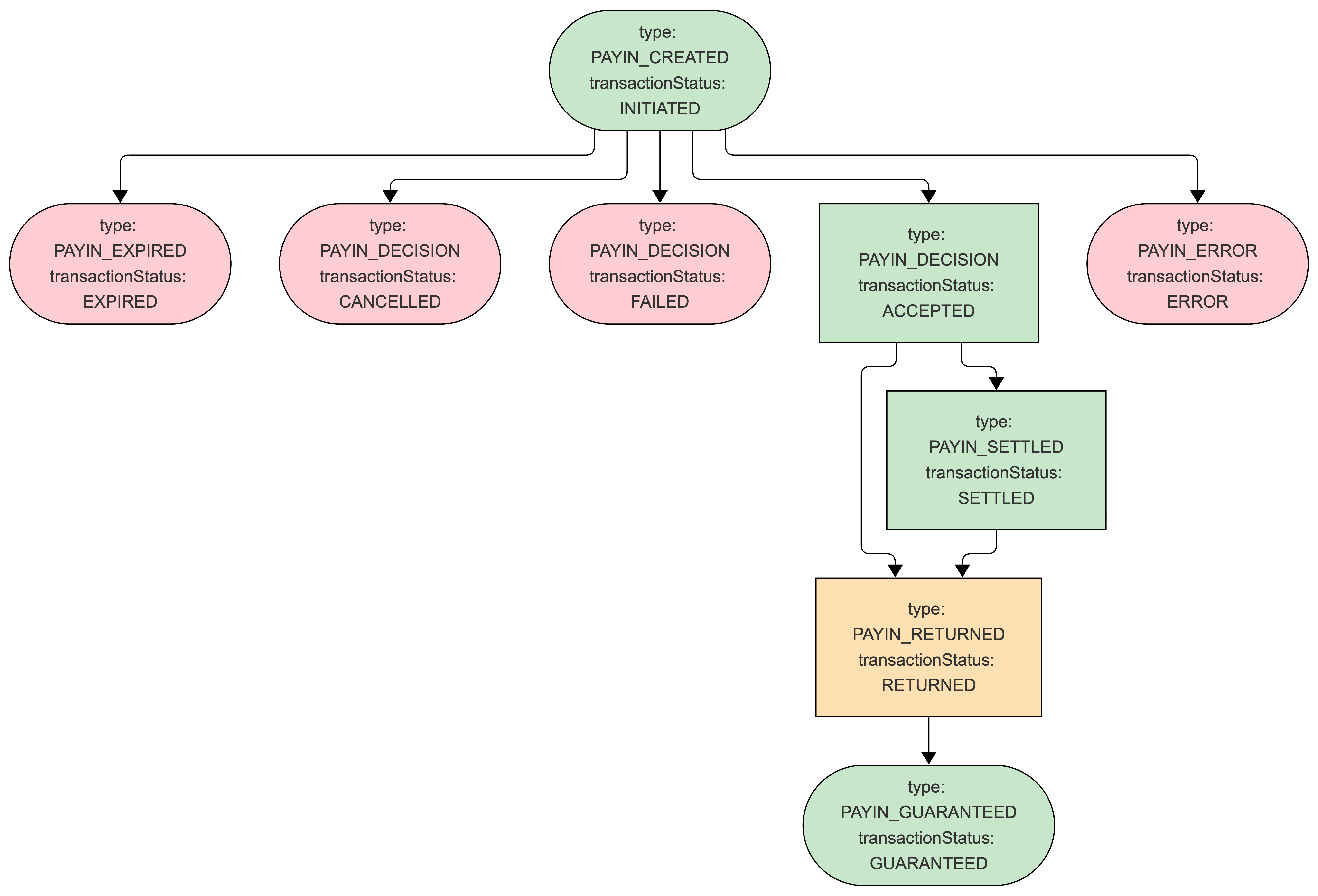
Configure the webhook endpoint and the enabled events in the Admin Dashboard. Not every event is mandatory, particularly intermediate statuses. At a minimum, Yaspa strongly recommends enabling ACCEPTED, SETTLED, RETURNED, and the terminal statuses, which together capture every failure mode and every status with risk or settlement implications:
Settlement and Reconciliation in the Admin Dashboard
Yaspa processes guaranteed pay-ins over Same Day ACH, with a 3pm Central Time final cutoff. Funds settle into the merchant's Virtual Account and are released into the Available Balance for withdrawal on T+2.
- A pay-in reaching
ACCEPTEDbefore 3pm CT on Monday is markedSETTLEDand released into the Available Balance around 11am CT on Wednesday. - A pay-in accepted after 3pm CT on Tuesday is available on Friday morning.
- Between acceptance and settlement, pay-ins count toward the Pending Balance shown beside the balance summary on the Admin Dashboard Ledger page.
- If a pay-in is returned and the return code is covered by the guarantee, Yaspa marks it
GUARANTEEDand releases funds on the normal schedule.
Finance users can withdraw from the Available Balance at any time with the Withdraw button on the Ledger page. Set an amount that maintains the required minimum balance and select a destination account. Withdrawals are processed as instant credits to the merchant business account, falling back to Same Day ACH if instant is unavailable or unsupported by the bank holding the account. The Ledger page also provides detailed balance activity reporting (pay-ins, payouts, top-ups and withdrawals), which can be filtered and exported as CSV for reconciliation.
First Time Customer Sequence Diagram
The following diagram shows the complete integration flow from initiation to full approval. Settlement, reconciliation, and failure conditions are excluded for clarity.
Returning Customer Sequence Diagram
Returning customers with bank accounts in good standing enjoy a streamlined user experience. Upon redirection to the Yaspa hosted payment page, returning customers will be able to select from accounts on file to complete payment. To configure the hosted payment page for a returning customer, provide an established customerIdentifier with the corresponding customerDetails.email in the request body, as Yaspa uses the former to create the saved account and validates that the latter matches that on file with the saved account. Otherwise, the integration is essentially the same as the first time customer flow.
Failure Handling
The hosted journey shows clear messages so that customers can resolve soft declines in-session and understand a failure before being redirected back. While it is not necessary to establish your own messaging for each possible scenario, failure handling may be configured based on the following transaction status and error details provided via webhook notification.
| Status | error | errorReason | Description | Recommendation |
|---|---|---|---|---|
ERROR | FNM1 | Account name did not match KYC name | Fuzzy name matching failed: the name in customerDetails differs unacceptably from the name on file with the bank. | Yaspa shows the customer an appropriate message before redirecting. The customer may retry with a different account, but repeated failures may indicate attempted fraud. |
ERROR | PIA4 | Retry limit for insufficient funds (US) reached | Declined because the account balance was insufficient. | Customers can pick a different account in-session or retry with a lower amount. |
ERROR | VAL1 | Pay-in merchant limit exceeded | Requested amount exceeded a configured limit. | The customer may retry in-session with a lower amount as shown on the error screen or later when velocity has decreased or the limit has reset. |
ERROR | VAL2 | Pay-in merchant customer weekly limit exceeded | As above. | As above. |
ERROR | VAL5 | Minimum deposit amount | Requested amount is too low. | The customer may retry with a higher amount. |
FAILED | PIA3 | ACH_DECLINED | Declined due to elevated risk. | A second attempt is highly likely to fail for the same reason. |
ERROR | PIR12 | Customer has been blacklisted | Yaspa has blocklisted the customer. | Unblocking is a manual process. Contact Yaspa. |
ERROR | PIA5 | Account details blocked | Yaspa has blocklisted the account. | Unblocking is a manual process. Contact Yaspa. |
FAILED | RKF1 | Riskified fraud check declined | Declined due to elevated risk, as determined by a third party. | A second attempt is highly likely to fail for the same reason. |
EXPIRED | n/a | n/a | The customer did not complete the session in time. Expiry is typically 30 minutes. | The customer has most likely abandoned the transaction. They may retry but may not be on the page to see any notification. |
CANCELLED | n/a | n/a | The transaction was cancelled. | The customer may try again. |
RETURNED | R** | Return code description | Yaspa received an ACH return. The code (for example R01) and description (for example Insufficient funds) are in error and errorReason respectively. | If the return code is covered by the guarantee, a GUARANTEED webhook follows and Yaspa covers the lost funds. Flag the customer as high-risk. |
Updated 3 days ago