
Support and Operations Guide
This page is provided as a quick reference for support and operations teams looking after live Yaspa integrations. Refer to the preceding sections for more detailed integration information.
Ledger: Available Balance Management
Key Concepts
You will use the Ledger page of the Admin Dashboard to manage your Available Balance. This includes withdrawing transaction funds and reporting for settlement and reconciliation respectively as well as topping up the balance to fund anticipated payout volumes.
Important Considerations
- User Roles: Only users with Finance rights will be able to interact with the Ledger page; contact your Site Admin to be configured as a Finance user.
- Withdrawals and Minimum Balance: You must keep your Available Balance above the agreed minimum balance to avoid processing disruptions. This minimum will be clearly displayed in the Withdraw modal to prevent users from accidentally withdrawing excessive amounts. Withdrawals are processed as instant credits to the merchant business account, falling back to Same Day ACH if instant is unavailable or unsupported by the bank holding the account.
- Top ups and Payout Funding: Payout funds are deducted from the Available Balance immediately upon approval. Ensure your balance comfortably covers anticipated payout volumes accordingly. Please note also that top ups are processed using Same Day ACH and must be submitted and approved prior to 3pm Central Time on banking days to be released into the Available Balance the same day. It is critical that debit blocks are configured to allow these transactions.
User Guide
The ledger is managed fully within the Ledger page as follows:
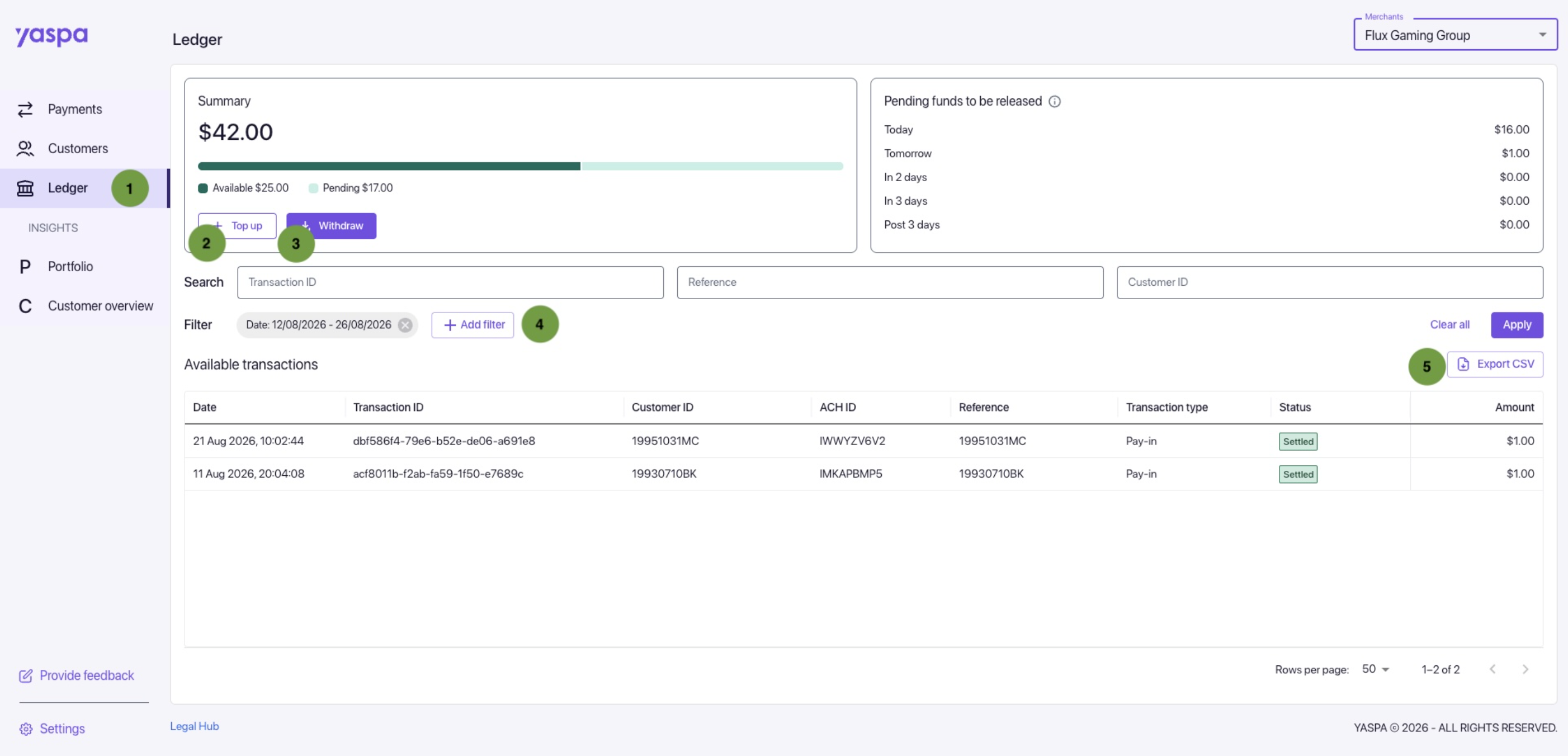
- Access: As a Finance user, click the Ledger tab on the left to open the Ledger page.
- Top up: Click the Top up button to open the Top up modal and add funds.
- Withdraw: Click on the Withdraw button to open the Withdraw button and withdraw funds.
- Filter: Add filters such as date and transaction type to create a report.
- Export CSV: Click Export CSV to download the resulting report.
Yaspa Support
Contact Information & Helpful Links
| Resource | Access Control | Link |
|---|---|---|
| Support Portal | Invitation required | https://yaspa-us.atlassian.net/servicedesk/customer/portal/ |
| Help Centre | Public | https://support.yaspa.com/ |
Common Questions
| Question | Answer |
|---|---|
| What is Yaspa’s settlement speed? | Yaspa typically releases approved pay-in funds on T+2, with a 3pm Central Time cutoff; payout funds are deducted immediately upon approval. Funds remain pending between approval and can be tracked in the “Pending funds to be released” panel on the Ledger page of the Admin Dashboard. |
| What will my users see on their bank statements? | The transaction information shown on the statement is influenced by the receiving bank, but generally the transaction record will include Yaspa’s name, your name, and a unique identifier that can be used for inquiries. |
| A user contacted us saying that Yaspa suspended their account. Why? Can they be unblocked? | Yaspa can block user attributes, including name, account and routing number, and unique identifier. Typically one or more of these attributes will be blocked due to elevated risk, such as suspicious behavior or an ACH return. Yaspa can review blocked users upon request; however, the standards for unblocking are appropriately high. A user may be unblocked if:
|
| How do I manage returns/chargebacks? | Yaspa will be financially liable for all return codes covered by the guarantee, as stipulated in the contract and demonstrated during integration. In most cases, this is a full guarantee where Yaspa is liable for all pay-in returns. You are strongly encouraged to factor returns in your own risk controls, especially where the return code indicates potential fraud (Stopped Payment and Unauthorized return codes). |
| How do I resolve a returned payout/deposit? | From time to time, payouts will fail despite being approved by Yaspa and its banking partner. Typically this is due to the destination account being closed. In this case, ask the user to select a different account on file with Yaspa, or execute the payout/withdrawal using another payment method. |
Updated 4 days ago
Did this page help you?