
Payouts
Send ACH and real-time payouts in the US
Yaspa's Payouts product enables merchants to send money to consumer Checking / Savings accounts.
Integration follows the convention laid out in the Product Overview. Send Yaspa a payout instruction API call with the payment details and open the URL Yaspa returns to start the hosted payout journey. There, the customer grants Yaspa access to their account information. Yaspa retrieves account, activity and ownership information over open banking APIs, checks it against the customer information you provided to verify ownership, and checks the request against fraud rules and block lists before issuing an approval decision.
At the end of the flow, Yaspa returns the customer to a configurable redirect URL and sends server-side webhook notifications at each status update. Accepted transactions are deducted from the merchant's virtual account immediately and processed as credits over Same Day ACH or RTP/FedNow.
Payouts are not guaranteed. If a payout is returned, the affected funds are returned to the merchant's virtual account.
Configuration
Payouts have mandatory security requirements and additional configuration options.
Signing Payout Instructions
Payout instructions and related requests must be signed for security. See Payout Security.
Closed Loop
Optionally configure payouts as closed loop, where the bank selector is not available and the customer must select an account previously used for pay-ins to receive the payout. Enable it by sending "disableAddingNewBanks": true. Otherwise, or if false, the payout is open loop. Closed loop is strongly recommended because it helps prevent money laundering. Consider open loop only if you already have strong AML and payout controls.
Payout Approvals
Optionally insert a pause between the customer completing the hosted payout flow and the payout being processed so that you can review and approve or reject the payout. See Payout Approvals for details. Payout approvals are strongly recommended, and should only be disabled if you already have other disbursement review processes.
Real-time rails
Yaspa can process payouts over Same Day ACH or real-time RTP / FedNow rails. Control this with paymentGiro:
ACH: Same Day ACHINSTANT: RTP or FedNow
If you send INSTANT and the customer's bank doesn't support RTP or FedNow, or if the supported network is down, Yaspa automatically fails over to Same Day ACH and updates paymentGiro to ACHin subsequent webhooks. Pay attention to this failover, and make sure the customer is clearly told the expected settlement speed of their withdrawal.
Integration Guide
Create Hosted Payout API
When the customer selects Yaspa at checkout, use the Create Hosted Payout API to send Yaspa the information required to create a payout session as in the full example provided below:
curl --request POST \
  --url https://api.sandbox.us.yaspa.com/v2/payouts/hosted-payout/generate-link \
  --header 'AuthorizationCitizen: {private API key}' \
  --header 'Signature: {Base 64 encoded signature}' \
  --header 'Expires-at: {UNIX timestamp for signature expiration}' \
  --header 'accept: text/plain' \
  --header 'content-type: application/json' \
  --data '
{
  "customerIdentifier": "xekzyz3lorw9",
  "paymentGiro": "INSTANT",
  "amount": 10.01,
  "currency": "USD",
  "reference": "3pdcj42fpn9t",
  "supportedCountries": ["US"],
  "successRedirectUrl": "http://www.example.com/success",
  "failureRedirectUrl": "http://www.example.com/failure",
  "customerDetails": {
    "firstName": "John",
    "lastName": "Smith",
    "email": "[email protected]",
    "dob": "1970-01-01",
    "mobile": "+15555555555",
    "address": {
      "address1": "123 Any Street",
      "address2": "Apt A",
      "city": "Boston",
      "stateCode": "MA",
      "zipCode": "02134",
      "countryCode": "US"
    }
  },
  "disableAddingNewBanks": true,
  "isQueued": true
}
'
Upon receipt, Yaspa creates a transaction and maps it to a customer profile tied to the merchant. For customers paying the merchant with Yaspa for the first time, Yaspa creates a new customer tied to the the customerIdentifier paired with the customerDetails.email. The response is a link for the hosted payout session including a transaction identifier and a boolean to flag returning customers. Log the transaction-id value from the URL as this will be included in subsequent webhooks as the transactionId and can be used with the reference and customerIdentifier to tie the session and webhooks back to the your payment request and customer profile.
https://banks.sandbox.us.yaspa.com/hosted/payout?transaction-id=d7941707-fe9f-fa8d-2491-3da414&secondTimeUser=falseRedirect Handler
Redirect the customer to the URL in the API response, paying particular attention to container version requirements in native mobile apps. When the customer completes the flow, the hosted page redirects them to the success or failure URL depending on the outcome. Set these as static values in the Admin Dashboard, or per transaction using successRedirectUrl and failureRedirectUrl. The per-transaction approach is strongly recommended, because you can append data such as the reference to identify the result and session when the customer returns:
"successRedirectUrl": "https://www.example.com/success&ref={{ref}}",
"failureRedirectUrl": "https://www.example.com/failure&ref={{ref}}"Business operations must be triggered by webhooks, never by redirects or client-side interactions. A redirect to
successRedirectUrlaccompanied by aQUEUEDorACCEPTEDwebhook means the customer has completed their part of the flow, so their balance should be decremented.
Webhooks
Yaspa sends webhooks for status updates throughout the customer journey and processing thereafter. Pay particular attention to QUEUED when using payout approvals. A QUEUED or ACCEPTED webhook means the customer has successfully requested a payout/withdrawal, so decrement their balance by the requested amount. Listen for later updates and credit the funds back if the payout is ultimately unsuccessful.
Webhooks for payouts follow the payment webhook version 3 structure and are sent as HTTPS POST requests. As noted above, several merchant-defined identifiers follow the transaction throughout its lifecycle so that it can be easily mapped to your payment stack. Configure the webhook endpoint and the enabled events in the Admin Dashboard; payouts have a lean status model, so Yaspa recommends enabling all statuses. A typical example of the request body is as follows:
{
  "type": "PAYOUT_ACCEPTED",
  "data": {
    "id": "6ac023e2351a3351401565cf",
    "transactionId": "d7941707-fe9f-fa8d-2491-3da414",
    "version": "3",
    "transactionStatus": "ACCEPTED",
    "createdAt": "2026-10-02T21:36:34.693Z",
    "reference": "3pdcj42fpn9t",
    "language": "en",
    "merchant": {
      "id": "69bbee7367f8982c81665203",
      "tradingName": "example.com",
      "bank": "DWOLLA",
      "withdrawal": false
    },
    "customer": {
      "identifier": "xekzyz3lorw9"
    },
    "account": {
      "financialInstitution": "US Test Bank",
      "holderName": "John Smith",
      "numberLastFour": "7890",
      "routingNumber": "222222226",
      "counterPartyId": "69c15af567f8982c8166524c"
    },
    "payment": {
      "amount": "10.01",
      "currency": "USD",
      "giro": "INSTANT",
      "providerPaymentId": "mock-payout-tx-1790977001487"
    },
    "journey": {
      "type": "HOSTED_PAYOUT",
      "authType": "STANDARD",
      "verified": false
    }
  }
}
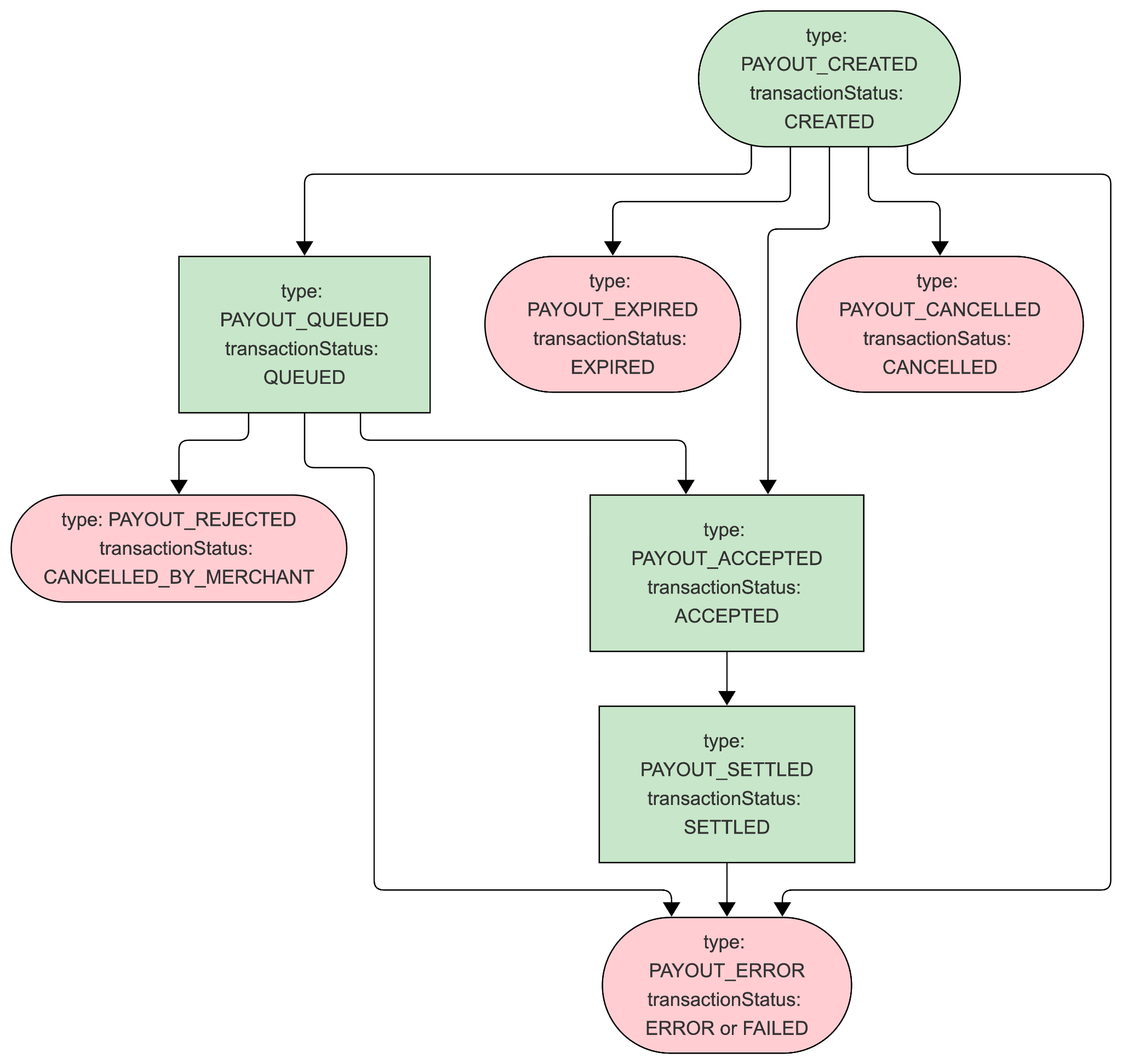
Type and Status Definitions
| Webhook type | Transaction status | Meaning |
|---|---|---|
PAYOUT_CREATED | CREATED | Starting point for the payout. |
PAYOUT_CANCELLED | CANCELLED | Terminal failure. The customer cancelled the flow before completion. |
PAYOUT_EXPIRED | EXPIRED | Terminal failure. The customer did not complete the hosted flow. Typically after 30 minutes of inactivity. |
PAYOUT_QUEUED | QUEUED | The customer completed the hosted journey and the payout awaits merchant approval. |
PAYOUT_REJECTED | CANCELLED_BY_MERCHANT | Terminal failure. The queued payout was rejected by the merchant. |
PAYOUT_ACCEPTED | ACCEPTED | Approved by the merchant, Yaspa, and Yaspa's banking partners. Funds are deducted from the merchant's Available Balance at this point. |
PAYOUT_SETTLED | SETTLED | Funds should be available in the receiver's account. |
PAYOUT_ERROR | ERROR | Terminal failure. Caused by velocity or limits, blocklist, or an ACH return. |
PAYOUT_ERROR | FAILED | Terminal failure. A risk decline. |
Status model
Only failures are truly terminal. SETTLED is not terminal, because returns can be filed after an otherwise successful payout.
Settlement and Reconciliation in the Admin Dashboard
Payouts are processed as credits according to paymentGiro:
- Same Day ACH: settles the same day if
ACCEPTEDbefore 3pm CT on a banking day, otherwise the customer receives funds with the next batch. - Real-time (
INSTANT): settles within seconds.
In both cases the SETTLED webhook indicates the transaction was submitted and the customer should have received the funds.
Payouts are deducted from the Virtual Account immediately on acceptance, so the Available Balance must hold enough above the minimum to cover all requested payouts. If Yaspa receives a return for a payout, the transaction is marked PAYOUT_ERROR and the funds are returned to the Available Balance.
Top up the balance from the Ledger page of the Admin Dashboard. Click Top up in the Summary box near the top left, as for the initial pre-launch top-up. Top-ups are Same Day ACH debits, so make sure the external business account allows debits. A top-up only appears in the balance once it settles. The cutoff for same-day settlement is 3pm Central Time. Plan ahead for expected increases in payout volume.
The Ledger page has filterable event-level reporting that can be exported as CSV for reconciliation. These actions are restricted to Finance users.
Sequence Diagram
Most payouts go to returning customers who have already used Yaspa for pay-ins to the merchant. Returning customers with accounts in good standing, including those who have only made pay-ins so far, get a streamlined experience. To identify a returning customer, send an established customerIdentifier with the matching customerDetails.email. Speak with your Yaspa Solution Architect if you would like to design fully open loop and/or unlinked payout flows.
Failure handling
The hosted journey shows clear messages so customer can resolve soft declines in-session and understand a failure before being redirected back. While it is not necessary to establish your own messaging for each possible scenario, failure handling may be configured based on the following transaction status and error details provided via webhook notification.
| Status | error | errorReason | Description | Recommendation |
|---|---|---|---|---|
EXPIRED | n/a | n/a | The customer did not complete the session in time. Expiry is typically 30 minutes. | The customer has most likely abandoned the transaction. They may retry, but may not be on the page to see any notice. |
CANCELLED | n/a | n/a | The customer cancelled the hosted journey. | The customer may try again. |
ERROR | n/a | n/a | The customer tried to withdraw more than the maximum. | The customer may retry with a lower amount as shown on the error screen or return later when velocity has decreased or the limit has reset. |
ERROR | n/a | Customer has been blacklisted | Yaspa has blocklisted the customer. | Unblocking is a manual process. Contact Yaspa. |
CANCELLED_BY_MERCHANT | n/a | n/a | The customer completed the flow, but the merchant rejected the payout. | Tell the customer the payout was not successful and give a reason as appropriate. Don't encourage a retry unless approval is substantially more likely. |
FAILED | n/a | n/a | Declined due to elevated risk, such as a blocklisted attribute or high velocity. | A second attempt is highly likely to fail for the same reason. |
ERROR | n/a | n/a | A successful payout later moved to ERROR. Most likely Yaspa received an ACH return and returned the funds to the Available Balance. | Payouts are most often returned due to account closure. Ask the customer to choose a different destination account, or pay out with a different method. |
Updated 3 days ago